
Quick Desk Guide: Picking High Retention Podcast Moments For Vertical Shorts Clips
Verified benchmarks for picking podcast moments that hold 65% of viewers past the first 3 seconds, plus Premiere and Resolve vertical shorts QC setup.
Find a claim that lands even when the host’s question is gone, then make sure it reads cleanly inside a 9:16 frame. That thumb is already poised to swipe, so audition the moment muted with captions on before you sink time into polish.
What are the verified benchmarks for picking high retention podcast moments for vertical shorts clips?
When a vertical short uses a punch-in or pattern interrupt during its first 3 seconds, viewer retention beyond that first swipe decision can reach 65% [TikTok Creative Center Hook Study, 2025]. If your guest spends that window warming up, shift the in-point and hit the punch-in on the stressed word carrying the claim.
High-retention talking-head cuts on YouTube Shorts and Instagram Reels typically change the picture at 2.5 to 4.0 second intervals using B-roll, a graphic callout, or a zoom cut [Wistia State of Video Report, 2025]. Let that cadence expose a locked-off interview hold that sags, then tighten the crop, go wide again, or add a clarifying callout. Among surveyed video marketers, 61% name vertical shorts shorter than 60 seconds as the best-ROI video format across paid and organic social channels [Wyzowl Video Marketing Statistics, 2026].
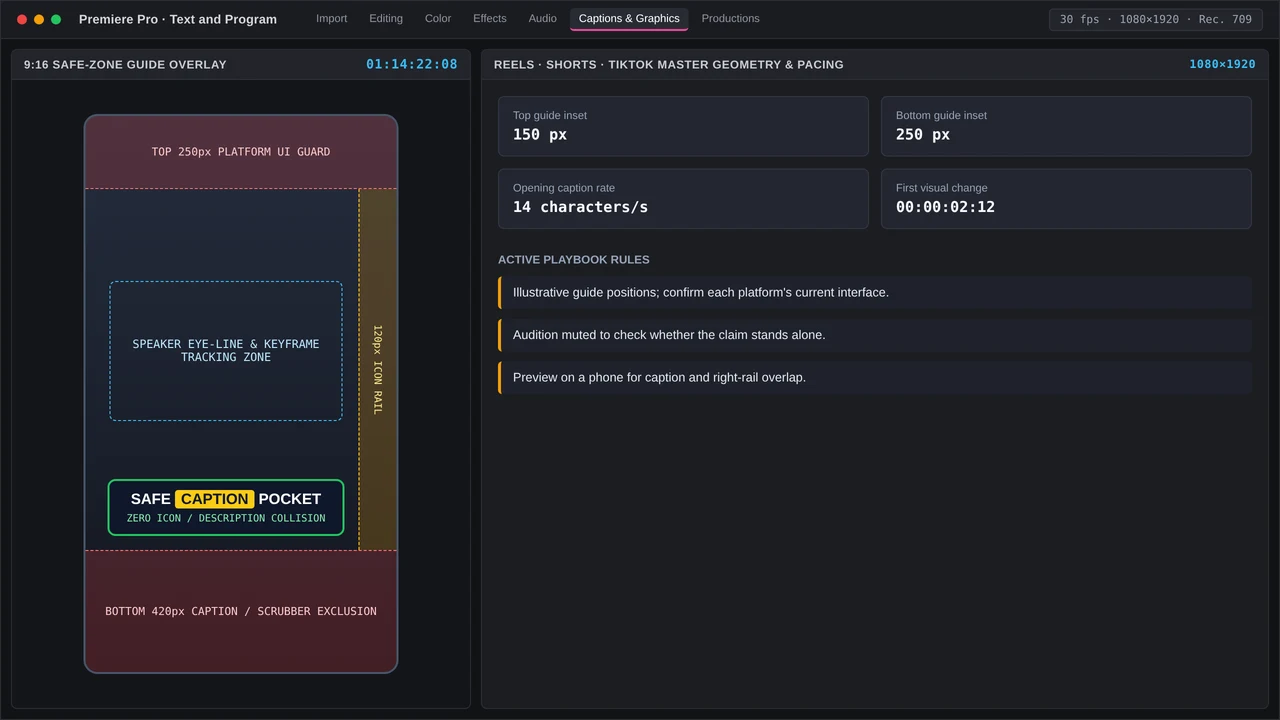
As many as 75% of people scrolling mobile social feeds may watch on mute in workplace or public settings [Verizon Media & Publicis Mobile Viewing Study, 2024]. For 1080x1920 exports to TikTok, Reels, and Shorts, burned-in captions need a 250 px minimum lift above the lower edge, with 150 px kept below the upper one [Meta & YouTube Vertical Safe-Zone Guidelines, 2025]. Preview on a phone, since right-rail action icons can sit over your text.
Netflix caps adult English subtitles at 20 characters each second and 42 characters on a line, while the BBC recommends 160 to 180 words per minute [Netflix Partner Help Center Timed Text Guide, 2025]. When captions make the viewer sprint, shorten the excerpt or find a different take.
| Check | Desk benchmark | Pass condition |
|---|---|---|
| Hook interrupt | Visual change inside 3 seconds | Pattern interrupt before the swipe window closes |
| Cut density | Visual change every 2.5 to 4.0 seconds | Zoom, B-roll, or callout, not a static hold |
| Clip length | Under 60 seconds | Standalone claim with the payoff inside the short |
| Caption clearance | 250 px above bottom, 150 px below top | No overlap with 1080x1920 UI chrome |
| Read rate | 20 CPS and 42 CPL | Line stays legible on a muted phone |
How you mark a keeper on the long timeline
Find a result viewers could repeat, then mark the start of that claim and its payoff. Place the opening punch-in within 3 seconds and get out when the thought lands. A laugh stays when it carries that claim; trim chuckling that holds up the necessary words.
Step-by-step Premiere Pro and DaVinci Resolve setup for picking high retention podcast moments for vertical shorts clips
Premiere Pro sequence, transcript, and caption stack
Premiere Pro v25 or v26 lets you search transcripts from the Text panel. Remove pauses and filler with text-based editing before adding zoom cuts. Duplicate your sequence first; after changing the frame size to 1080x1920, reframe your speaker with the contextual Properties panel.
Build captions in Text, place them through Properties, and preserve 250 px of bottom clearance. For graphic reuse, upgrade those captions to graphics, then export a Motion Graphics template for use in the Graphics Templates panel.
An annual single-app plan runs $23 per month. Once the moment is selected, Excalibur can handle anchor centering and gain macros, with a one-time $100 license.
Resolve transcription, reframe, and review handoff
DaVinci Resolve Studio v19 or v20 offers Neural Engine transcription for locating and marking those claims. That pass needs the $295 perpetual Studio license. On the Edit page, reframe to 1080x1920, match caption clearance, and grade after the rhythm settles.
Frame.io v4 runs $15 monthly per user; its review notes sync back into Premiere markers, so feedback about a sluggish opening stays on that exact moment. Plain captions travel better in agency handoffs because Resolve has a thinner template shelf and fewer options.
Common timeline bottlenecks and QC checks when handling picking high retention podcast moments for vertical shorts clips
An opening chuckle and closing qualifier can bury a useful claim. Before trimming, confirm the qualifier leaves its meaning intact, then remove pauses ahead of scale keyframing. Any later timing tweak otherwise means another pass across every zoom.
Muted playback, safe zones, and false punch notes
Play the whole batch on mute and check each clip for a visual interrupt within 3 seconds, plus changes at 2.5 to 4.0 second intervals. Clearances on that 1080x1920 frame should measure 250 px at the bottom and 150 px at the top, with text held to 42 CPL and 20 CPS. Flag captions that vanish before you finish reading.
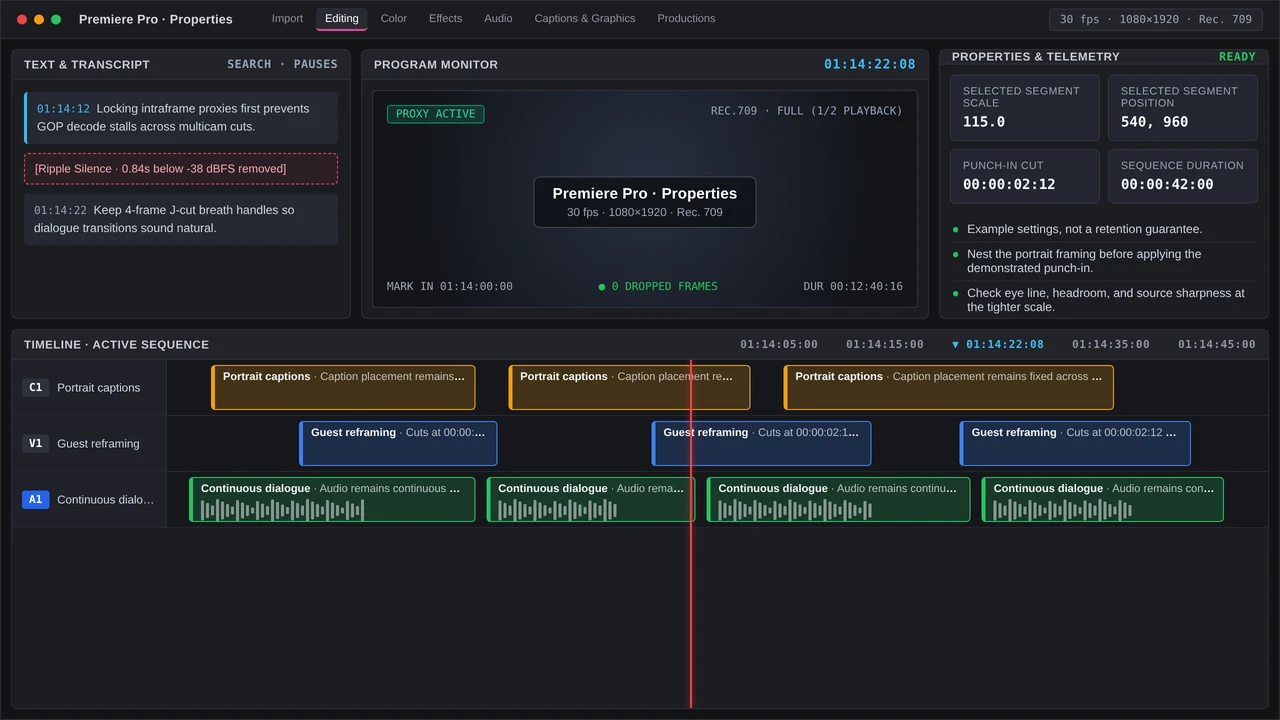
For each 16:9 Graphics Template, inspect its copy in the Text panel, then review framing through Properties. A slow open needs a fresh in-point on the stronger claim; regenerate every caption touched by that edit.
More in Razor & Reel
Auto Reframe versus manual keyframes for 9:16 Premiere Pro: hook windows, 250 px safe zones, and QC that keeps faces inside the vertical crop.